Validation Mode
Say Goodbye to Pen-and-Paper Validation
Every X-ray inspection point that protects a Critical Control Point has to prove, again and again, that it still detects what it is supposed to detect. In most plants that proof lives on paper: an operator passes a test card through the machine, writes the result in a log, signs it and files it in a binder. When the line is busy, checks slip. When the auditor arrives, someone spends hours searching for the right page.
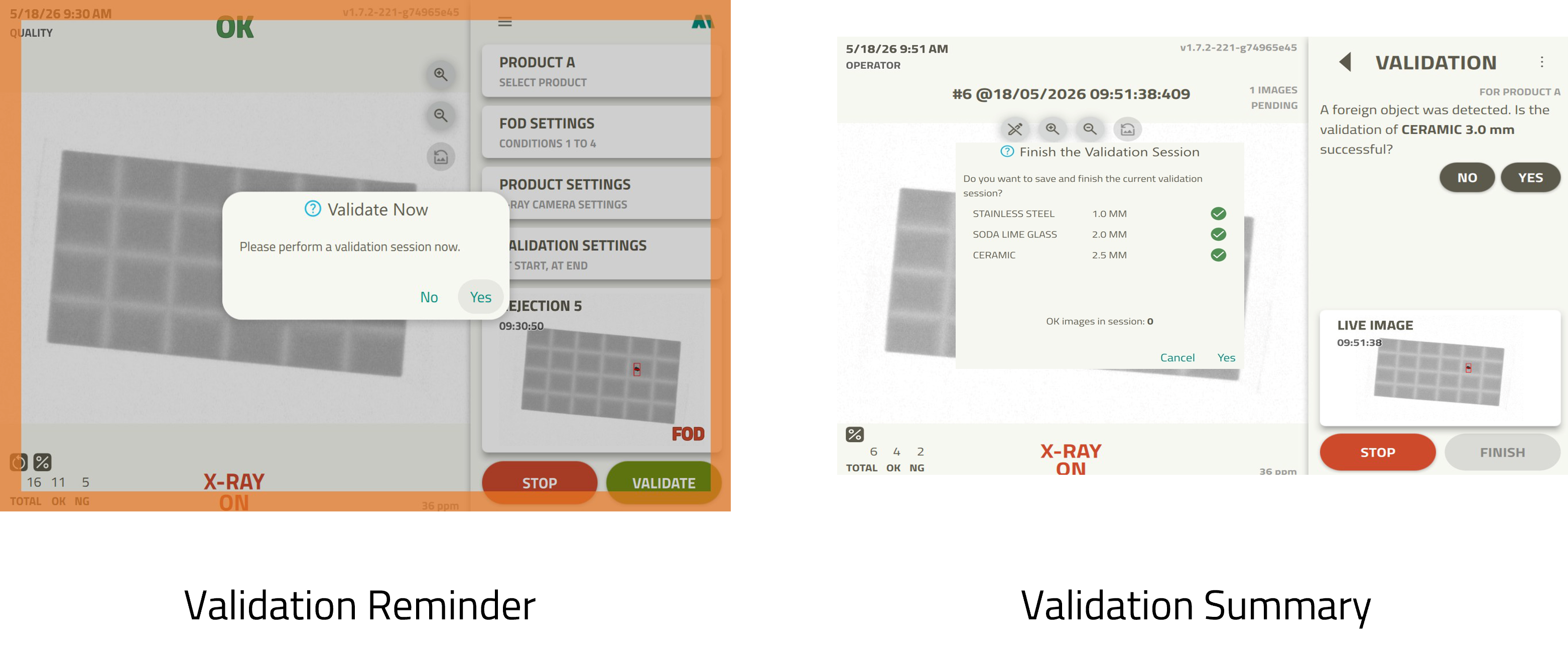
Validation Mode builds that routine check into the X-ray system itself. The machine reminds your operators when a validation is due, guides them through it and saves the result digitally, together with the X-ray images that prove it.
The Hidden Cost of Manual Validation
Paper-based validation records create risks that are easy to overlook:
- **Missed or late checks** when production pressure takes priority
- **Incomplete or illegible logs** that weaken your evidence
- **Hours lost at audit time** digging through binders for a single entry
- **No live view** of whether validations are being done on schedule
- **No image evidence** to show what the machine actually detected
Manual logs depend on operators remembering the check and writing it down correctly, with nothing to show what the machine saw
The X-ray system prompts, guides and records every validation digitally, with the X-ray images attached as proof
How It Works: Validation Built Into the Line
Validation Mode is part of MEKI AI and is enabled per product, so each product can follow its own validation routine.
Never Miss a Check
Validation reminders appear on screen as a dialog and a blinking warning frame. You decide when they are triggered:
- **At production start or end** of each batch
- **Every given running time**, from 1 to 48 hours of production
- **Every given number of inspected products**, up to 10,000
- **With an optional alarm**: the yellow light flashes and the buzzer sounds until the operator acts on the reminder
Certified Validation Cards
Validations are performed with certified validation cards, each containing a foreign object of known material, size and density:
- **Register each card** with its certificate, provider, size (up to 7 mm) and density
- **Assign the right cards** to each product
- **Require every card** in each session when your procedure calls for it
Guided or Flexible
Choose the way of working that suits your team:
- **Wizard mode** walks the operator through each card, one at a time, with clear on-screen instructions
- **Flexible mode** lets experienced users validate cards in any order, as many times as needed
- **OK images** confirm that a product without a card passes without a false detection
Accountability Built In
Every validation is tied to the person who performed it:
- **Named validation users** sign in with a password and their signature, or as guests if you allow it
- **Enforced validation** prevents a due validation from being skipped
- **Automatic stop on failure**: if a validation fails, the inspection stops and the system stays locked until a Quality, Admin or Service user enters their password
Proof You Can Show an Auditor
When the session is finished, everything is saved: who performed it, when, which cards were used, the verdict for each image, any notes and the X-ray images themselves. Validation products are marked in the Data Viewer and can be filtered in one click, and the results can be accessed remotely by the responsible party.
Pull up any past validation in seconds, with the X-ray images that prove the result
See at a glance whether validations are being completed on schedule
Quality Benefits You Can Measure
Before Validation Mode
- **Checks forgotten or done late** during busy production
- **Paper logs** that are hard to read, easy to lose and slow to search
- **Quality staff tied up** in manual documentation
- **No clear picture** of validation compliance until something goes wrong
After Implementation
- **Documented validations**, never forgotten and always on time
- **Audit-ready in seconds**, with any past check pulled up instantly and no binders to dig through
- **A quality team freed from manual documentation**, focused on managing exceptions
- **A clear, real-time view** of whether validations are being completed on schedule
Integration Benefits
Validation Mode works seamlessly with your existing MEKI systems:
Covers the periodic check of your X-ray CCP, alongside your inspection and rejection equipment
Runs on the MEKI AI software already inspecting your products, enabled and configured per product
Ready to Digitize Your CCP Validation?
Replace paper validation logs with a guided, enforced and fully documented process that keeps your X-ray inspection audit-ready every day.
Contact Mekitec for a Consultation
**Disclaimer:** All information is provided for information purposes only and shall not be considered as assured characteristics. The information and technical data presented in this document are subject to change. Customers should obtain and verify the latest relevant information before placing orders.
Copyright 2026 Mekitec Ltd. All rights reserved
Key Features
Automatic Validation Reminders
Prompts operators at production start or end, by running time or by number of inspected products